Build Your Own Bloomberg Terminal With AI
 Build Your Own Bloomberg Terminal With AIA step-by-step guide to going from ChatGPT earnings previews to a custom investment dashboard—no engineering team required We're hosting a Custom Agents Camp with Notion on Friday, April 3, at noon ET. We'll walk through the agents powering daily operations at Every, and give you the templates to start using them yourself. Plus, designer Brian Lovin will share how Notion uses custom agents and what they're building next. Was this newsletter forwarded to you? Sign up to get it in your inbox. When I was an analyst at a hedge fund, earnings season was a sprint that lasted a month. I had 40 firms to cover, each one reporting over a four-week window. Every earnings preview—the research brief laying out what to expect before a company's quarterly results were announced—followed the same grind: Grab the data, update my financial model, and write up the takeaways. Four hours of work per company, minimum. It's a task that is begging to be automated by AI. The process is structured and repeatable, and the data sources are well-defined. But if you've ever pointed ChatGPT at a collection of data and gotten back a summary with basic math mistakes or that ignored important metrics of a company's financial health, you know how disappointing the reality can be. This kind of experience is why many investment teams give up on AI. They try it once, conclude the technology isn't ready, and go back to the old way. What those teams don't realize is that they are judging the entire technology based on the sophistication of one tool. It's like giving up on all email after using the clunky Microsoft 365 browser product. Over the past six months running AI consulting for finance teams, I've been walking clients through what developments in AI capabilities can now let us achieve: the same earnings preview—Shopify's next quarter—at four levels of tooling, each one more sophisticated than the last. By level four, the system reads your model, applies your thinking about what makes a great company, and runs while you sleep. Here's how to get there. Level one: The custom GPTThis is where most investment teams start. You set up a ChatGPT project—a dedicated workspace where you can store instructions and upload documents—with a detailed prompt that tells the model how you want your earnings preview structured. The prompt I use specifies everything: how to lay out the beat/miss analysis (where you compare actual results against Wall Street expectations), which financial metrics to prioritize, how to handle management guidance, and whether to source consensus estimates from the web or more premium data sources. I attach the Securities Exchange Commission (SEC) filings and earnings release directly to the project. Run it in thinking mode—where the model reasons longer before answering—and after about 15 minutes, you get a solid preview with web-sourced data, SEC citations, and a clear beat/miss breakdown. But the output has quirks. Tables format data the way ChatGPT wants, not the way I think—financial metrics are spread across columns when I want financial metrics on the side. Everything lives in a chat window instead of in a custom website. You can partly fix that by adding a second prompt—"Create an HTML dashboard from this"—but now the preview requires two steps. Try to combine both prompts into a single workflow, and you hit ChatGPT's 8,000-character project instruction limit. Level one's ceiling is that it's great for structured, single-task analysis. But it falls apart when you need multi-step workflows with detailed instructions for each step. Level two: Claude with skills and data connectorsThe solution for level one's character limits is Claude, which stores detailed instructions as Skills—reusable prompt files the model reads before each task, separate from your message. Instead of cramming everything into one prompt, you break your earnings preview instructions, dashboard formatting, investment philosophy, and analyst workflow into distinct skill files. These skill files need a specific trigger to work—for example, "Earnings preview" to invoke the earnings preview skill. For Shopify, I load my earnings preview skill, a front-end design skill for dashboards, and my core investment analyst philosophy—which covers things like what data matters or what defines a great company for earnings reviews, previews, management meeting preps, and every recurring task. Claude reads all of them before responding. The other upgrade is data connectivity through MCP—model context protocol, a standardized way for AI tools to connect to external data sources. My favorite is Daloopa, a financial data provider that surfaces structured fundamental data from earnings reports and SEC filings. The model pulls real financial data, including the key metrics depending on industry, instead of scraping the web. The result is a single prompt that produces an interactive dashboard with growth rate charts, properly formatted income statements, and metrics laid out my way. Because Claude read my investment philosophy, it knows I care about operating leverage, gross margin trajectory, and revenue mix shifts—and pulls those without being asked. Where level two breaks down: It can't access my internal data. My proprietary financial model lives in an Excel file on my computer. My call notes and thesis documents are in local folders Claude can't see. Level three: Claude Cowork and local file accessClaude Cowork—a wrapper around Claude Code designed for non-technical users—solves the internal data problem. It runs on your machine and can access your local files: Excel models, notes folders, PDFs, anything on your computer. For the same Shopify preview, Cowork reads the same skills as level two but can also search my company folder—the local directory with my financial model, call notes, thesis documents, and prior previews and reviews. It breaks the task into subagents and handles more compute per task since it runs Claude Code under the hood. The extra context changes what the output can do. Cowork connects transcript language to historical trends from my model—explaining, for instance, why gross margin is growing by 200 basis points year over year. It also reads my Excel model, extracts my projections for revenue, earnings per share, and operating margins, and compares those to consensus estimates, showing me exactly where I diverge. That kind of analysis used to require searching across transcripts from earnings calls for each line item in my model or hooking up third-party tools to see differences to live consensus metrics. Now it's a single prompt. The limitation of this step is that each task produces a separate output. An earnings review is one dashboard. A preview is another. Meeting prep is a third. What I want is a single workstation I can open each morning and see everything in one place. Level four: Claude Code and the custom dashboardAt level four, I'm in Claude Code—the command-line interface where you define custom commands, connect to multiple data sources, and run tasks for hours instead of minutes. I've built a single command called /work that encapsulates my entire analyst workflow. When I run it, Claude Code works continuously in the background—earnings reviews, previews, meeting preps, news reviews, thesis updates—and builds them all into a single, custom dashboard. It's your own Bloomberg-style workstation. At my last firm, we had an internal tool called Mosaic that showed everything about your areas of coverage in one place. It was a huge edge, and it took a dedicated engineering team to build. Level four lets me build that for myself. I open my dashboard in the morning, and it's already populated. News articles relevant to my coverage, prioritized by what I care about. Earnings previews—here's Shopify, with the same analysis from level three but living alongside everything else. Previews for upcoming reports. Each ticker has a full overview page: thesis, revenue trajectory, financial model view, meeting prep, and a historical dashboard adjustable to any time period. The whole thing deploys as a custom website. Level four compresses those 160 hours I used to spend each quarter into the time it takes Claude Code to run, plus the hour or so I spend reviewing and adding perspective. You still check the output and apply judgment—is that $2 billion revenue divergence realistic, or did my model get stale? The AI does the synthesis, the formatting, and the cross-referencing, and I do the thinking. 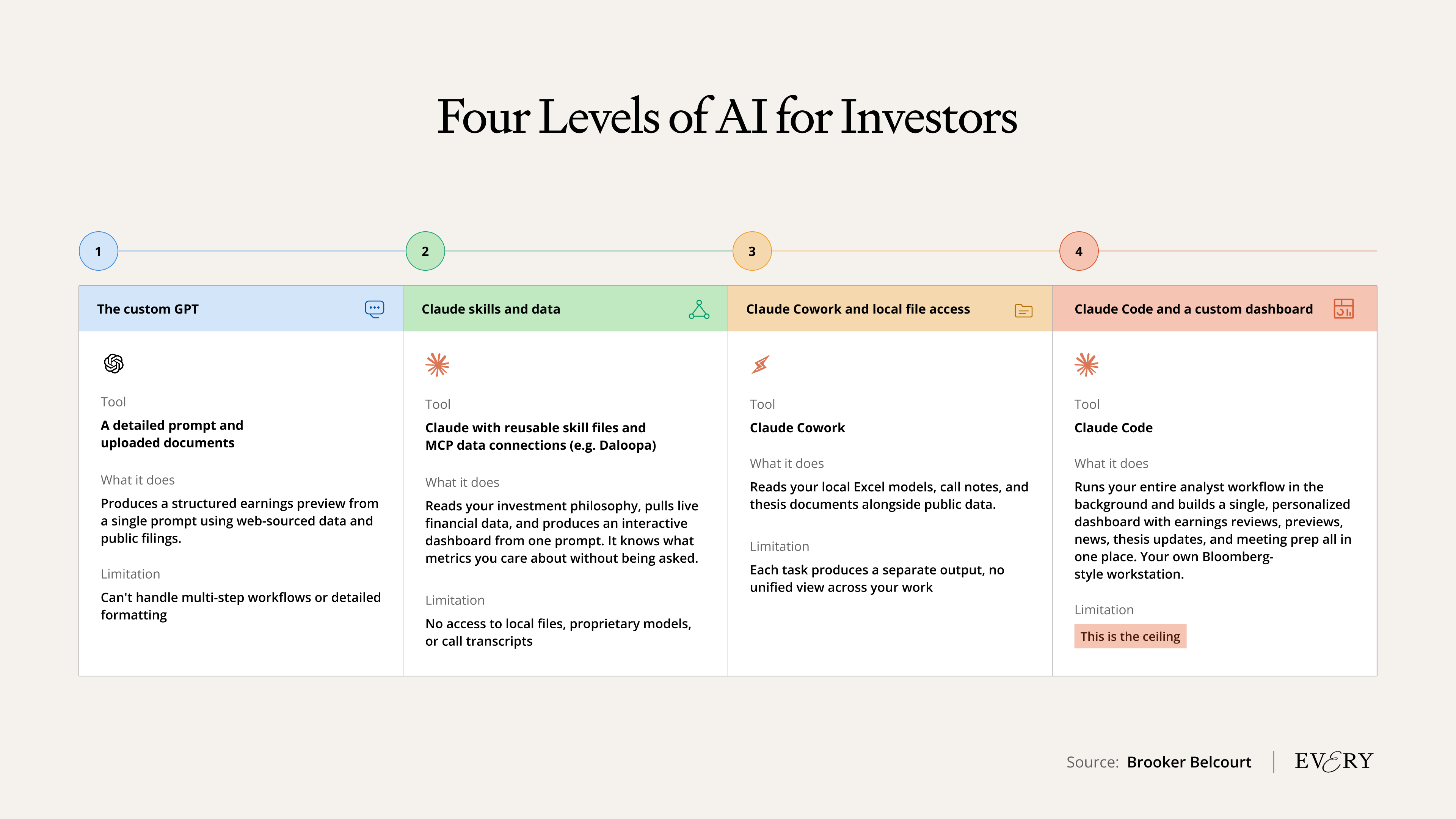 You don't need to be at level fourThere's value at every level. If a well-crafted ChatGPT project saves your team one to two hours per earnings preview across 40 names, that's 40-80 hours per quarter. That alone is worth it. You don't need to climb all four levels—at least, not all at once. Level one works for defined, repeatable tasks where you want a quick upgrade. Level two makes sense when you've outgrown single prompts and need the AI to internalize your investment philosophy, or when you want live data sources like Daloopa. Level three is for teams sitting on proprietary data—models, notes, call transcripts—that the AI needs to work with alongside public information. Level four is for people who want to build their own analyst workstation and are willing to invest time in Claude Code. AI has already changed how the firms that adopted it work. The only question left is which level you're at—and what you're leaving on the table. Brooker Belcourt is the head of financial services consulting at Every. Most recently, he led the finance vertical at Perplexity. To read more essays like this, subscribe to Every, and follow us on X at @every and on LinkedIn. We also do AI training, adoption, and innovation for companies. Work with us to bring AI into your organization. Discover Every's upcoming workshops and camps, and access recordings from past events. For sponsorship opportunities, reach out to sponsorships@every.to. Help us scale the only subscription you need to stay at the edge of AI. Explore open roles at Every. What did you think of this post?Get More Out Of Your SubscriptionTry our AI tools for ultimate productivity  Front-row access to the future of AI Front-row access to the future of AI  In-depth reviews of new models on release day Playbooks and guides for putting AI to work Prompts and use cases for builders In-depth reviews of new models on release day Playbooks and guides for putting AI to work Prompts and use cases for builders  Bundle of AI software Bundle of AI software  Sparkle: Organize your Mac with AI Sparkle: Organize your Mac with AI  Cora: The most human way to do email Cora: The most human way to do email  Spiral: Repurpose your content endlessly Spiral: Repurpose your content endlessly  Monologue: Effortless voice dictation for your Mac Monologue: Effortless voice dictation for your Mac |